Repeater
Repeater element is an element that allow to repeat group of elements.
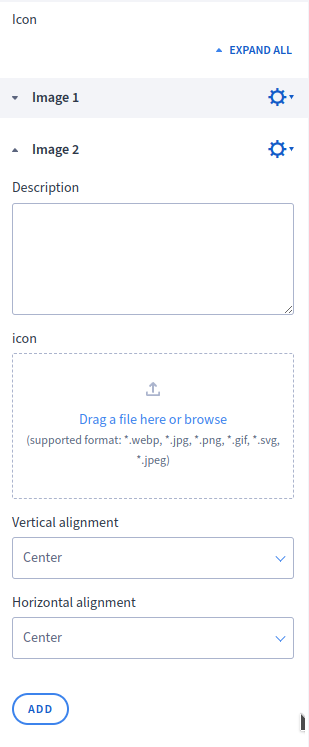
Options
| Name | Type | Required | Description |
|---|---|---|---|
| elements | array | yes | List of elements |
| defaultGroupLabel | string | yes | Default name of group elements |
| minActiveGroups | int | no | Minimum amount of active group elements |
| maxActiveGroups | int | no | Maximum amount of active group elements |
{
  "options": {
    "defaultGroupLabel" : "Icon",
    "minActiveGroups" : 1,
    "maxActiveGroups" : 10,
    "elements": [
      {
        "type" : "imageUpload",
        "name" : "icon",
        "label" : "icon"
      }
    ]
  }
}
elements
array Required list of elements. All elements are allowed to use. Elements can not have parameter supportsTranslations.
Elements name must be unique in options.
{
  "options": {
    "elements" : [
      {
        "type" : "select",
        "name" : "verticalAlignment",
        "label" : "Vertical alignment",
        "defaultValue" : "center",
        "hint": "Changes will be visible if the columns do not take up the entire available width of the row.",
        "options": {
          "selectOptions" : [
            { "key" : "up", "label" : "Up" },
            { "key" : "down", "label" : "Down" },
            { "key" : "center", "label" : "Center" },
            { "key" : "toTheTallestColumn", "label" : "Align the column height to the tallest column in the row" },
            { "key" : "theSameHeight", "label" : "Set the columns' content to the same height" }
          ]
        }
      }
    ]
  }
}
defaultGroupLabel
string Required name of group.
minActiveGroups
int Optional amount of given active groups of values. For example if 2 given, Merchant must fill at least 2 groups of values.
maxActiveGroups
int Optional amount of given active groups of values. For example if 2 given, Merchant must fill maximum 2 groups of values.
Build-in Validators
Element validates if given values are correct for given elements in options.
Available Validators
Element does not have any available validators.
Relations Support
Element does not support relations between elements.
Configuration output schema
{
  "<element_type>" : "repeater",
  "<element_name>" : string,
  "<element_label>" : string,
  "<element_isRequired>" : bool,
  "<element_options>" : {
    "<element_option_minActiveGroups>" : int,
    "<element_option_maxActiveGroups>" : int,
    "<element_option_defaultGroupLabel>" : string,
    "<element_option_elements>" : []
  }
}
{
    "name": "repeater",
    "type": "repeater",
    "label": "Icon",
    "options": {
        "minActiveGroups": 1,
        "maxActiveGroups": 10,
        "defaultGroupLabel": "Image",
        "elements": [
            { "name": "description", "type": "textarea", "label": "Description" },
            { "name": "icon", "type": "imageUpload", "label": "icon" },
            {
                "name": "verticalAlignment",
                "type": "select",
                "options": {
                    "selectOptions": [
                        { "key": "up", "label": "Up" },
                        { "key": "down", "label": "Down" },
                        { "key": "center", "label": "Center" }
                    ]
                },
                "label": "Vertical alignment",
                "defaultValue": "center"
            },
            {
                "name": "horizontalAlignment",
                "type": "select",
                "options": {
                    "selectOptions": [
                        { "key": "left", "label": "To the left" },
                        { "key": "right", "label": "To the right" },
                        { "key": "center", "label": "Center" }
                    ]
                },
                "label": "Horizontal alignment",
                "defaultValue": "center"
            }
        ]
    }
}
Element value
Value is a list of group in which we have 2 keys: values, active.
| Name | Type | Description |
|---|---|---|
| values | array | List with values |
| active | bool | Is given group is active |
[
  { "active" : true, "values" :  { "verticalAlignment" : "up" , "horizontalAlignment" : "left" } },
  { "active" : false, "values" :  { "verticalAlignment" : "down" , "horizontalAlignment" : "center" } },
  { "active" : true, "values" :  { "verticalAlignment" : "center" , "horizontalAlignment" : "right" } }
]
<div class="module_group">
    {% for group in moduleConfig.repeater %}
        {% if group.active %}
            <div class="horizontal_{{ group.values.horizontalAlignment }} vertical_{{ group.values.verticalAlignment }}">
                {% if group.values.icon %}
                    <img src="{{ group.values.icon.paths.original }}" />
                {% endif %}
                {% if group.values.description %}
                    <p>{{ group.values.description }}</p>
                {% endif %}
            </div>
        {% endif %}
    {% endfor %}
</div>
<div class="module_group">
    <div class="horizontal_left vertical_up">
            <img src="https://path.to.image.1" />
            <p>Description 1</p>
    </div>
    <div class="horizontal_center vertical_center">
            <img src="https://path.to.image.2" />
            <p>Description 2</p>
    </div>
</div>
Nesting elements inside Repeater
Repeater supports nesting any available element types inside its options.elements array. This includes other repeaters and device-dependent elements. The sections below document the most common nesting patterns.
Repeater with nested Repeater (2 levels)
A repeater can contain another repeater as one of its elements. This is useful when you need a list-within-a-list structure, for example a list of categories where each category can have multiple items.
JSON configuration
[
  {
    "label": "FAQ",
    "state": "unfolded",
    "elements": [
      {
        "name": "faq_categories",
        "type": "repeater",
        "label": "FAQ Categories",
        "supportsTranslations": true,
        "options": {
          "defaultGroupLabel": "Category",
          "minActiveGroups": 1,
          "maxActiveGroups": 10,
          "elements": [
            {
              "name": "category_title",
              "type": "text",
              "label": "Category title",
              "defaultValue": ""
            },
            {
              "name": "category_icon",
              "type": "imageUpload",
              "label": "Category icon"
            },
            {
              "name": "questions",
              "type": "repeater",
              "label": "Questions",
              "options": {
                "defaultGroupLabel": "Question",
                "minActiveGroups": 1,
                "maxActiveGroups": 20,
                "elements": [
                  {
                    "name": "question",
                    "type": "text",
                    "label": "Question",
                    "defaultValue": ""
                  },
                  {
                    "name": "answer",
                    "type": "textarea",
                    "label": "Answer",
                    "defaultValue": ""
                  }
                ]
              }
            }
          ]
        }
      }
    ]
  }
]
Element value
When a repeater is nested inside another repeater, the inner repeater's value follows the same structure — it appears as a list of { active, values } objects inside the parent group's values.
[
  {
    "active": true,
    "values": {
      "category_title": "Shipping",
      "category_icon": { "paths": { "original": "https://path.to.icon" } },
      "questions": [
        {
          "active": true,
          "values": {
            "question": "How long does shipping take?",
            "answer": "Standard shipping takes 3-5 business days."
          }
        },
        {
          "active": true,
          "values": {
            "question": "Do you ship internationally?",
            "answer": "Yes, we ship to over 50 countries."
          }
        }
      ]
    }
  },
  {
    "active": true,
    "values": {
      "category_title": "Returns",
      "category_icon": { "paths": { "original": "https://path.to.icon2" } },
      "questions": [
        {
          "active": true,
          "values": {
            "question": "What is your return policy?",
            "answer": "You can return items within 30 days."
          }
        }
      ]
    }
  }
]
Twig
To render nested repeaters, use a nested {% for %} loop. The inner repeater value is available at group.values.<inner_repeater_name>.
<div class="faq">
    {% for category in moduleConfig.faq_categories %}
        {% if category.active %}
            <div class="faq__category">
                {% if category.values.category_icon %}
                    <img src="{{ category.values.category_icon.paths.original }}" alt="{{ category.values.category_title }}" />
                {% endif %}
                <h2>{{ category.values.category_title }}</h2>

                {% for item in category.values.questions %}
                    {% if item.active %}
                        <div class="faq__item">
                            <h3>{{ item.values.question }}</h3>
                            <p>{{ item.values.answer }}</p>
                        </div>
                    {% endif %}
                {% endfor %}
            </div>
        {% endif %}
    {% endfor %}
</div>
<div class="faq">
    <div class="faq__category">
        <img src="https://path.to.icon" alt="Shipping" />
        <h2>Shipping</h2>
        <div class="faq__item">
            <h3>How long does shipping take?</h3>
            <p>Standard shipping takes 3-5 business days.</p>
        </div>
        <div class="faq__item">
            <h3>Do you ship internationally?</h3>
            <p>Yes, we ship to over 50 countries.</p>
        </div>
    </div>
    <div class="faq__category">
        <img src="https://path.to.icon2" alt="Returns" />
        <h2>Returns</h2>
        <div class="faq__item">
            <h3>What is your return policy?</h3>
            <p>You can return items within 30 days.</p>
        </div>
    </div>
</div>
JSON translations
{
  "module": {
    "pl_PL": {
      "FAQ" : "FAQ"
    },
    "en_US": {
      "FAQ" : "FAQ"
    }
  },
  "schema": {
    "pl_PL": {
      "FAQ Categories" : "Kategorie FAQ",
      "Category" : "Kategoria",
      "Category title" : "Tytuł kategorii",
      "Category icon" : "Ikona kategorii",
      "Questions" : "Pytania",
      "Question" : "Pytanie",
      "Answer" : "Odpowiedź"
    },
    "en_US": {
      "FAQ Categories" : "FAQ Categories",
      "Category" : "Category",
      "Category title" : "Category title",
      "Category icon" : "Category icon",
      "Questions" : "Questions",
      "Question" : "Question",
      "Answer" : "Answer"
    }
  }
}
Repeater with DeviceDependent element
A repeater can contain a deviceDependent element when each repeated group needs per-device configuration (e.g. a banner list where each banner has a different image per device).
JSON configuration
[
  {
    "label": "Banners",
    "state": "unfolded",
    "elements": [
      {
        "name": "banners",
        "type": "repeater",
        "label": "Banner list",
        "supportsTranslations": true,
        "options": {
          "defaultGroupLabel": "Banner",
          "minActiveGroups": 1,
          "maxActiveGroups": 8,
          "elements": [
            {
              "name": "title",
              "type": "text",
              "label": "Banner title",
              "defaultValue": ""
            },
            {
              "name": "link",
              "type": "text",
              "label": "Banner link",
              "options": {
                "placeholder": "https://"
              }
            },
            {
              "name": "responsive_image",
              "type": "deviceDependent",
              "label": "Banner image per device",
              "options": {
                "messageBoxForDifferentDevices": "Upload a different banner image for each device to ensure optimal display.",
                "elements": [
                  {
                    "name": "image",
                    "type": "imageUpload",
                    "label": "Banner image",
                    "isRequired": true
                  },
                  {
                    "name": "image_alt",
                    "type": "text",
                    "label": "Image alt text",
                    "defaultValue": ""
                  }
                ]
              }
            }
          ]
        }
      }
    ]
  }
]
Element value
The deviceDependent element inside a repeater group provides per-device values (mobile, tablet, laptop, desktop) along with the differentValuesPerDevice flag.
[
  {
    "active": true,
    "values": {
      "title": "Summer sale",
      "link": "https://shop.example.com/summer",
      "responsive_image": {
        "differentValuesPerDevice": true,
        "mobile": {
          "image": { "paths": { "original": "https://path.to.mobile.banner" } },
          "image_alt": "Summer sale mobile"
        },
        "tablet": {
          "image": { "paths": { "original": "https://path.to.tablet.banner" } },
          "image_alt": "Summer sale tablet"
        },
        "laptop": {
          "image": { "paths": { "original": "https://path.to.laptop.banner" } },
          "image_alt": "Summer sale laptop"
        },
        "desktop": {
          "image": { "paths": { "original": "https://path.to.desktop.banner" } },
          "image_alt": "Summer sale desktop"
        }
      }
    }
  }
]
Twig
Access per-device values via group.values.<deviceDependent_name>.<device>.<element_name>.
<div class="banners">
    {% for banner in moduleConfig.banners %}
        {% if banner.active %}
            {% set images = banner.values.responsive_image %}

            <a href="{{ banner.values.link }}" class="banner">
                <h3>{{ banner.values.title }}</h3>
                <picture>
                    {% if images.desktop.image.paths.original %}
                        <source media="(min-width: 1440px)" srcset="{{ images.desktop.image.paths.original }}">
                    {% endif %}
                    {% if images.laptop.image.paths.original %}
                        <source media="(min-width: 1000px)" srcset="{{ images.laptop.image.paths.original }}">
                    {% endif %}
                    {% if images.tablet.image.paths.original %}
                        <source media="(min-width: 576px)" srcset="{{ images.tablet.image.paths.original }}">
                    {% endif %}
                    {% if images.mobile.image.paths.original %}
                        <source media="(min-width: 1px)" srcset="{{ images.mobile.image.paths.original }}">
                    {% endif %}
                    <img
                        src="{{ images.desktop.image.paths.original }}"
                        alt="{{ images.desktop.image_alt }}"
                    />
                </picture>
            </a>
        {% endif %}
    {% endfor %}
</div>
<div class="banners">
    <a href="https://shop.example.com/summer" class="banner">
        <h3>Summer sale</h3>
        <picture>
            <source media="(min-width: 1440px)" srcset="https://path.to.desktop.banner">
            <source media="(min-width: 1000px)" srcset="https://path.to.laptop.banner">
            <source media="(min-width: 576px)" srcset="https://path.to.tablet.banner">
            <source media="(min-width: 1px)" srcset="https://path.to.mobile.banner">
            <img src="https://path.to.desktop.banner" alt="Summer sale desktop" />
        </picture>
    </a>
</div>
JSON translations
{
  "schema": {
    "pl_PL": {
      "Banners" : "Bannery",
      "Banner list" : "Lista bannerów",
      "Banner" : "Banner",
      "Banner title" : "Tytuł bannera",
      "Banner link" : "Link bannera",
      "Banner image per device" : "Obraz bannera na urządzenie",
      "Banner image" : "Obraz bannera",
      "Image alt text" : "Tekst alternatywny obrazu"
    },
    "en_US": {
      "Banners" : "Banners",
      "Banner list" : "Banner list",
      "Banner" : "Banner",
      "Banner title" : "Banner title",
      "Banner link" : "Banner link",
      "Banner image per device" : "Banner image per device",
      "Banner image" : "Banner image",
      "Image alt text" : "Image alt text"
    }
  }
}
Deeply nested Repeaters (3 levels)
Repeaters can be nested multiple levels deep. Below is an example of a 3-level deep chain: Repeater → Repeater → Repeater. This pattern is useful for complex hierarchical data structures such as multi-level navigation menus or category trees.
Note: While deep nesting is supported, keep in mind that each nesting level adds complexity for the Merchant. Use
maxActiveGroupsto keep the UI manageable.
JSON configuration
[
  {
    "label": "Multi-level menu",
    "state": "folded",
    "elements": [
      {
        "name": "menu_lvl1",
        "type": "repeater",
        "label": "Menu (3 levels)",
        "labelDescription": "Repeater → Repeater → Repeater",
        "supportsTranslations": true,
        "options": {
          "defaultGroupLabel": "Level 1",
          "maxActiveGroups": 5,
          "elements": [
            {
              "name": "lvl1_title",
              "type": "text",
              "label": "Level 1 title",
              "defaultValue": ""
            },
            {
              "name": "lvl1_link",
              "type": "text",
              "label": "Level 1 link",
              "defaultValue": "",
              "options": {
                "placeholder": "https://"
              }
            },
            {
              "name": "lvl1_submenu",
              "type": "repeater",
              "label": "Level 2 items",
              "options": {
                "defaultGroupLabel": "Level 2",
                "maxActiveGroups": 10,
                "elements": [
                  {
                    "name": "lvl2_title",
                    "type": "text",
                    "label": "Level 2 title",
                    "defaultValue": ""
                  },
                  {
                    "name": "lvl2_link",
                    "type": "text",
                    "label": "Level 2 link",
                    "defaultValue": "",
                    "options": {
                      "placeholder": "https://"
                    }
                  },
                  {
                    "name": "lvl2_submenu",
                    "type": "repeater",
                    "label": "Level 3 items",
                    "options": {
                      "defaultGroupLabel": "Level 3",
                      "maxActiveGroups": 10,
                      "elements": [
                        {
                          "name": "lvl3_title",
                          "type": "text",
                          "label": "Level 3 title",
                          "defaultValue": ""
                        },
                        {
                          "name": "lvl3_link",
                          "type": "text",
                          "label": "Level 3 link",
                          "defaultValue": "",
                          "options": {
                            "placeholder": "https://"
                          }
                        },
                        {
                          "name": "lvl3_color",
                          "type": "colorPicker",
                          "label": "Item color",
                          "defaultValue": "#000000"
                        }
                      ]
                    }
                  }
                ]
              }
            }
          ]
        }
      }
    ]
  }
]
Element value
Each nesting level follows the same { active, values } structure. The inner repeater's value is an array of groups nested under its parent's values.
[
  {
    "active": true,
    "values": {
      "lvl1_title": "Products",
      "lvl1_link": "https://shop.example.com/products",
      "lvl1_submenu": [
        {
          "active": true,
          "values": {
            "lvl2_title": "Electronics",
            "lvl2_link": "https://shop.example.com/products/electronics",
            "lvl2_submenu": [
              {
                "active": true,
                "values": {
                  "lvl3_title": "Smartphones",
                  "lvl3_link": "https://shop.example.com/products/electronics/smartphones",
                  "lvl3_color": "#1a73e8"
                }
              },
              {
                "active": true,
                "values": {
                  "lvl3_title": "Laptops",
                  "lvl3_link": "https://shop.example.com/products/electronics/laptops",
                  "lvl3_color": "#e81a1a"
                }
              }
            ]
          }
        },
        {
          "active": true,
          "values": {
            "lvl2_title": "Clothing",
            "lvl2_link": "https://shop.example.com/products/clothing",
            "lvl2_submenu": [
              {
                "active": true,
                "values": {
                  "lvl3_title": "T-shirts",
                  "lvl3_link": "https://shop.example.com/products/clothing/tshirts",
                  "lvl3_color": "#34a853"
                }
              }
            ]
          }
        }
      ]
    }
  }
]
Twig
Use nested {% for %} loops — one per nesting level. Always check group.active before rendering.
<nav class="menu">
    {% for lvl1 in moduleConfig.menu_lvl1 %}
        {% if lvl1.active %}
            <div class="menu__lvl1">
                <a href="{{ lvl1.values.lvl1_link }}">{{ lvl1.values.lvl1_title }}</a>

                {% if lvl1.values.lvl1_submenu is not empty %}
                    <div class="menu__lvl2-container">
                        {% for lvl2 in lvl1.values.lvl1_submenu %}
                            {% if lvl2.active %}
                                <div class="menu__lvl2">
                                    <a href="{{ lvl2.values.lvl2_link }}">{{ lvl2.values.lvl2_title }}</a>

                                    {% if lvl2.values.lvl2_submenu is not empty %}
                                        <div class="menu__lvl3-container">
                                            {% for lvl3 in lvl2.values.lvl2_submenu %}
                                                {% if lvl3.active %}
                                                    <a
                                                        href="{{ lvl3.values.lvl3_link }}"
                                                        style="color: {{ lvl3.values.lvl3_color }};"
                                                        class="menu__lvl3"
                                                    >
                                                        {{ lvl3.values.lvl3_title }}
                                                    </a>
                                                {% endif %}
                                            {% endfor %}
                                        </div>
                                    {% endif %}
                                </div>
                            {% endif %}
                        {% endfor %}
                    </div>
                {% endif %}
            </div>
        {% endif %}
    {% endfor %}
</nav>
<nav class="menu">
    <div class="menu__lvl1">
        <a href="https://shop.example.com/products">Products</a>
        <div class="menu__lvl2-container">
            <div class="menu__lvl2">
                <a href="https://shop.example.com/products/electronics">Electronics</a>
                <div class="menu__lvl3-container">
                    <a href="https://shop.example.com/products/electronics/smartphones"
                       style="color: #1a73e8;"
                       class="menu__lvl3">
                        Smartphones
                    </a>
                    <a href="https://shop.example.com/products/electronics/laptops"
                       style="color: #e81a1a;"
                       class="menu__lvl3">
                        Laptops
                    </a>
                </div>
            </div>
            <div class="menu__lvl2">
                <a href="https://shop.example.com/products/clothing">Clothing</a>
                <div class="menu__lvl3-container">
                    <a href="https://shop.example.com/products/clothing/tshirts"
                       style="color: #34a853;"
                       class="menu__lvl3">
                        T-shirts
                    </a>
                </div>
            </div>
        </div>
    </div>
</nav>
JSON translations
{
  "schema": {
    "pl_PL": {
      "Multi-level menu" : "Menu wielopoziomowe",
      "Menu (3 levels)" : "Menu (3 poziomy)",
      "Level 1" : "Poziom 1",
      "Level 1 title" : "Tytuł poziomu 1",
      "Level 1 link" : "Link poziomu 1",
      "Level 2 items" : "Elementy poziomu 2",
      "Level 2" : "Poziom 2",
      "Level 2 title" : "Tytuł poziomu 2",
      "Level 2 link" : "Link poziomu 2",
      "Level 3 items" : "Elementy poziomu 3",
      "Level 3" : "Poziom 3",
      "Level 3 title" : "Tytuł poziomu 3",
      "Level 3 link" : "Link poziomu 3",
      "Item color" : "Kolor elementu"
    },
    "en_US": {
      "Multi-level menu" : "Multi-level menu",
      "Menu (3 levels)" : "Menu (3 levels)",
      "Level 1" : "Level 1",
      "Level 1 title" : "Level 1 title",
      "Level 1 link" : "Level 1 link",
      "Level 2 items" : "Level 2 items",
      "Level 2" : "Level 2",
      "Level 2 title" : "Level 2 title",
      "Level 2 link" : "Level 2 link",
      "Level 3 items" : "Level 3 items",
      "Level 3" : "Level 3",
      "Level 3 title" : "Level 3 title",
      "Level 3 link" : "Level 3 link",
      "Item color" : "Item color"
    }
  }
}
Example of module
Twig
<div class="module_group">
    <h2>{{ translate("List") }}</h2>
    {% for group in moduleConfig.boxes %}
        {% if group.active %}
            <div class="module_group_element">
                {% if group.values.image %}
                    <img src="{{ group.values.image.paths.original }}" />
                {% endif %}
                {% if group.values.title %}
                    <b>{{ group.values.title }}</b>
                {% endif %}
                {% if group.values.description %}
                    <p>{{ group.values.description }}</p>
                {% endif %}
            </div>
        {% endif %}
    {% endfor %}
</div>
JSON configuration
[
  {
    "label": "Boxes",
    "state": "folded",
    "elements": [
      {
        "name": "boxes",
        "type": "repeater",
        "label": "Boxes",
        "supportsTranslations": true,
        "options": {
          "elements": [
            { "name": "image", "type": "imageUpload", "label": "Image" },
            { "name": "title", "type": "text", "label": "Title" },
            { "name": "description", "type": "text", "label": "Description" }
          ],
          "defaultGroupLabel": "Box",
          "minActiveGroups": 1,
          "maxActiveGroups": 5
        }
      }
    ]
  }
]
JSON translations
{
  "module": {
    "pl_PL": {
      "List" : "Lista"
    },
    "en_US": {
      "List" : "List"
    }
  },
  "schema": {
    "pl_PL": {
      "Boxes" : "Elementy",
      "Box" : "Element",
      "Image" : "Obrazek",
      "Title": "Tytuł",
      "Description" : "Opis"
    },
    "en_US": {
      "Box": "Box",
      "Boxes" : "Boxes",
      "Image" : "Image",
      "Title": "Title",
      "Description" : "Description"
    }
  }
}