Radio
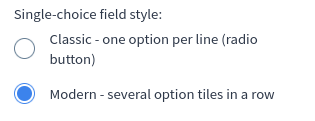
Radio element represents a list of input with radio type with one name.
Options
radioOptions
array List with options. Every object on the list must have label and key. Field labelDescription and hint are optional.
radioOptions.key
string Represents value in input.
radioOptions.label
string Represents text next to input.
radioOptions.labelDescription
string Optional parameter. Represents a description for label. It is an additional text which will look different from label.
radioOptions.hint
string|array Optional parameter. This option will show question mark next to a label.
When user will mouse over, tooltip with your hint will be shown.
If you want to use placeholders you need to pass array. If you do not use placeholders, pass string for hint.
{
  "hint" : {
    "message" : "Message as markdown with placeholders %s %s",
    "placeholderValues" : ["placeholder 1", "placeholder 2"]
  }
}
For message in array and when hint is type of string you can pass Markdown.
placeholderValues represents list of placeholders (string, int, float) which will be placed in message. They are useful when you have for example links in message.
If you place link in placeholderValues, in translations you do not need to pass links. To place placeholder in message is used printf function.
For example if you want place text placeholder in message, you must put %s in your message.
Whole documentation with list of parameters you can use, you can find here.
{
  "options": {
    "radioOptions" : [
      { "key" : "KEY 1" , "label" : "Label 1"},
      { "key" : "KEY 2" , "label" : "Label 2", "labelDescription" : "additional description for option 2"},
      { "key" : "KEY 3" , "label" : "Label 3", "hint" : "hint for option 3 as markdown"},
      { "key" : "KEY 4" , "label" : "Label 4", "hint" : "hint for option 4", "labelDescription" : "Description" },
      {
        "key" : "KEY 5" ,
        "label" : "Label 5",
        "labelDescription" : "Description",
        "hint" : {
          "message" : "Message as markdown %s %s",
          "placeholderValues" : ["placeholder 1", "placeholder 2"]
        }
      }
    ]
  }
}
Build-in Validators
Element validates if given value is located on your radioOptions list.
Available Validators
Element does not have available validators.
Relations Support
Element supports relations between elements.
Configuration output schema
{
  "<element_type>" : "radio",
  "<element_name>" : string,
  "<element_label>" : string,
  "<element_labelDescription>" : string,
  "<element_isRequired>" : bool,
  "<element_isHidden>" : bool,
  "<element_defaultValue>" : string|int|float,
  "<element_options>" : {
    "<element_option_radioOptions>" : [
      {
        "<radioOptions_key>" : string,
        "<radioOptions_label>" : string,
        "<radioOptions_labelDescription>" : string,
        "<radioOptions_hint>" : string|array,
      },
      {
        "<radioOptions_key>" : string,
        "<radioOptions_label>" : string,
        "<radioOptions_labelDescription>" : string,
        "<radioOptions_hint>" : string|array,
      }
    ]
  }
}
{
  "type" : "radio",
  "name" : "vendor_logo_click",
  "label" : "After clicking on the vendor's name/logo, move to:",
  "defaultValue" : "url",
  "options": {
    "radioOptions" : [
      {
        "key" : "list_of_products",
        "label" : "list of this vendor's products in the store (recommended)",
        "hint" : "Customers can view the vendor's product offers without leaving your store."
      },
      {
        "key" : "url",
        "label" : "URL address from vendor's settings (if added)",
        "hint" : "If no URL has been added in the vendor's settings, the link will direct you to the list of its products in your store by default."
      }
    ]
  }
}
The result element may look different, but for documentation purposes, you can see below how your configuration will look.
<label>After clicking on the vendor's name/logo, move to:</label>

<label>
    <input type="radio" name="vendor_logo_click" value="list_of_products"> list of this vendor's products in the store (recommended)
    <p class="questionmark">Customers can view the vendor's product offers without leaving your store.</p>
</label>

<label>
    <input type="radio" name="vendor_logo_click" value="url" checked> URL address from vendor's settings (if added)
    <p class="questionmark">If no URL has been added in the vendor's settings, the link will direct you to the list of its products in your store by default.</p>
</label>
Element value
If value is filled: string.