PointPicker
PointPicker element allows users to select a point position on a 2D plane using two sliders (vertical and horizontal). It is designed for use cases like positioning hotspots on images. The value is stored as an object with x, y coordinates (0–100) and a unit field.
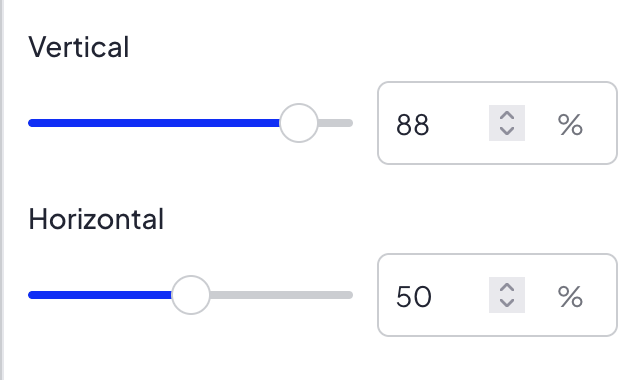
Options
PointPicker does not have any options.
Built-in Validators
Element has a built-in validator that checks:
x— must be an integer between 0 and 100y— must be an integer between 0 and 100unit— must be%
No extra keys are allowed. All three keys (x, y, unit) are required.
Available Validators
Element does not have any available validators.
Relations Support
Element does not support relations between elements.
Configuration output schema
schema
{
  "<element_type>" : "pointPicker",
  "<element_name>" : string,
  "<element_label>" : string,
  "<element_labelDescription>" : string,
  "<element_isRequired>" : bool,
  "<element_isHidden>" : bool,
  "<element_defaultValue>" : {
    "x" : int,
    "y" : int,
    "unit" : "%"
  }
}
example
{
  "type" : "pointPicker",
  "name" : "hotspotPosition",
  "label" : "Hotspot position",
  "labelDescription" : "Select the position of the hotspot on the image",
  "isRequired" : true,
  "isHidden" : false,
  "defaultValue" : {
    "x" : 50,
    "y" : 50,
    "unit" : "%"
  }
}
Element value
Element value is an object with 3 keys:
| Name | Type | Description |
|---|---|---|
| x | int | Horizontal position (0–100) |
| y | int | Vertical position (0–100) |
| unit | string | Unit of the position, always % |
Frontend behavior
In New SVE frontend, values from sliders are rounded with Math.round on each change before saving to form state. This ensures x and y are always stored as integers.
usage in module TWIG
<div style="left: {{ moduleConfig.hotspotPosition.x }}{{ moduleConfig.hotspotPosition.unit }}; top: {{ moduleConfig.hotspotPosition.y }}{{ moduleConfig.hotspotPosition.unit }};">
    ...
</div>
Example of module
Twig
Twig
<div class="hotspot-container" style="position: relative;">
    <img src="{{ moduleConfig.image.paths.original }}" alt="">
    <div class="hotspot-pin" style="position: absolute; left: {{ moduleConfig.hotspotPosition.x }}{{ moduleConfig.hotspotPosition.unit }}; top: {{ moduleConfig.hotspotPosition.y }}{{ moduleConfig.hotspotPosition.unit }};">
        {{ translate("Pin") }}
    </div>
</div>
JSON configuration
JSON configuration
[
  {
    "label": "General settings",
    "state": "unfolded",
    "elements": [
      {
        "name": "image",
        "type": "imageUpload",
        "label": "Image",
        "isRequired": true
      },
      {
        "name": "hotspotPosition",
        "type": "pointPicker",
        "label": "Hotspot position",
        "labelDescription": "Select the position of the hotspot on the image",
        "isRequired": true,
        "defaultValue": {
          "x": 50,
          "y": 50,
          "unit": "%"
        }
      }
    ]
  }
]